
On-Set Dailies
A high-performance dailies processing system built for the pace and complexity of modern film and television production.
On-Set Dailies handles camera original media from ingest through delivery — editorial formats, web review proxies, and VFX pulls, all processed simultaneously. Multi-GPU acceleration and optimized storage I/O keep up with the volume of a full production day without becoming the bottleneck on set or at the lab.

Camera format support is comprehensive across all major manufacturers and recording formats. Production audio sync, metadata exchange, and LUT management are built into the core workflow — not bolted on. Dailies metadata travels with the material in whatever format the production requires, with broad support for existing exchange standards across editorial, VFX, and lab pipelines.
Color is handled with the same rigor applied in post. Full ACES workflow support and ASC FDL handling means looks developed on set and framing decisions translate correctly downstream — to editorial, to VFX, and into finishing. Looks are applied automatically based on clip metadata, so color and intent follow the material through the entire chain without manual intervention or reconciliation.
A flexible node-based pipeline drives deliverable configuration — each output can carry its own framing, burn-in, and colorspace settings, all running in parallel from a single pass through the source material.For productions running automated or hybrid pipelines, full API, CLI, and MCP integration is available.
Key capabilities include:
- Multi-GPU accelerated camera original media processing
- Simultaneous editorial, proxy, and VFX pull output
- API, CLI, and MCP interfaces
- Node-based pipeline with per-deliverable framing, burn-in, and colorspace settings
- ASC FDL support
- Automatic look application driven by clip metadata
- Automated QC inspection to detect issues such as clipped highlights or crushed blacks.
- Manual and automated production audio sync
- Full ACES workflow support
- Comprehensive dailies metadata exchange format support
- OSD Product Description
- Usability
- QC tools
- Rendering
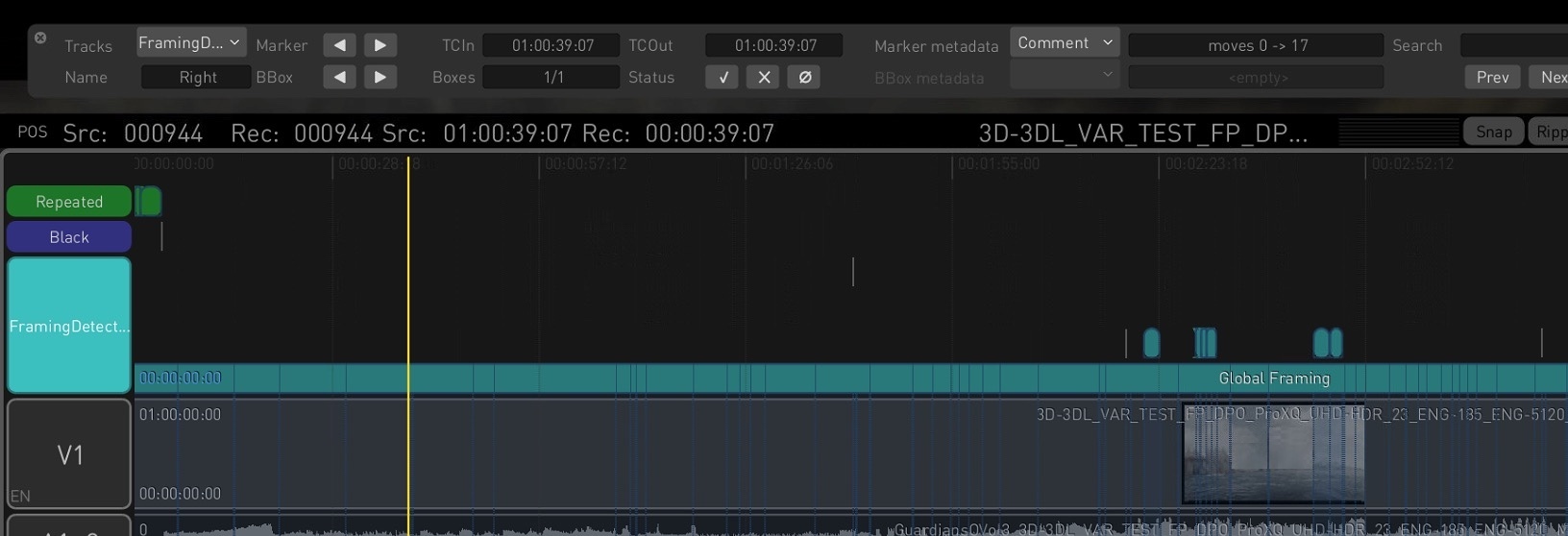
Advanced Framing Detection
The Auto QC encoder on the Render Page now offers enhanced visual QC by detecting black borders, black frames, and repeated frames. In addition to the existing framing detection track, two new marker tracks are generated when the BLACK FRM and REPEAT FRM settings are enabled in the Configuration Pane for the Auto QC encoder, helping users pinpoint black or repeated frames directly in the timeline.
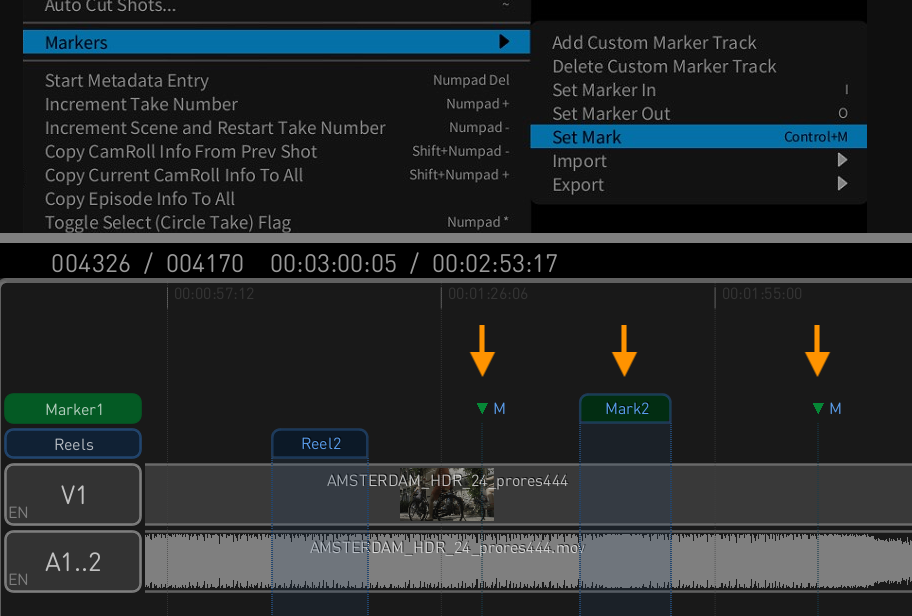
Custom Timeline Markers
A new Edit > Markers menu item introduces expanded support for creating and managing custom markers. Users can now add dedicated marker tracks, set in/out points for range markers, place position markers, and import or export marker files. Range markers span two frames, defined using I and O, while position markers are added at the playhead using the Set Mark menu option or the Ctrl+M shortcut.
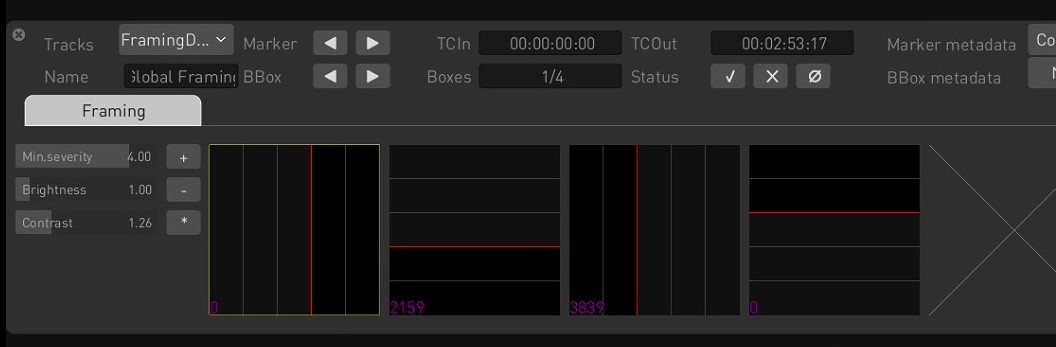
Marker Navigator Window
The new Marker Navigator window simplifies navigation across marker tracks in the timeline. Users can switch between tracks, browse markers and bounding boxes, and view timecodes. It includes status icons to accept or reject detections and a thumbnail panel for previewing issues. Sliders for minimum severity, brightness, and contrast allow fine-tuning of detection visibility, making QC review more efficient and precise.
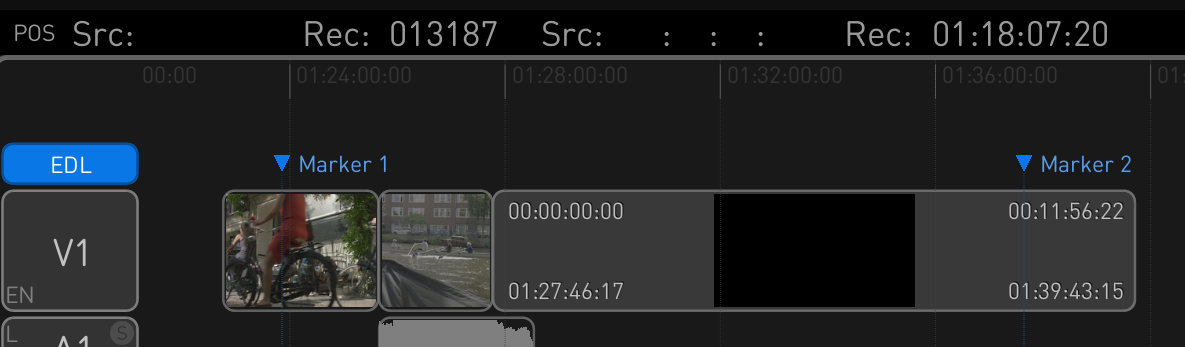
Marker Import/Export via EDL
Transkoder now supports importing and exporting marker tracks using the EDL format. Markers exported from DaVinci Resolve can be imported via a Timeline menu option, creating a new EDL track in the timeline. Conversely, any marker track in Transkoder can be exported as an EDL file, enabling smooth interoperability with other tools.

Broadcast TV Tool
Based on Colorfront’s Perceptual Engine, the Broadcast TV tool offers fast, professional conversion between various display color spaces, such as converting between SDR and HDR, supporting full broadcast ranges. The operator simply has to choose the source and target display color space—the tool does the rest. For fine-tuning the conversion and the color correction, various trim controls are available, such as ambient light compensation, scene exposure as well as color correction tools (CDL).
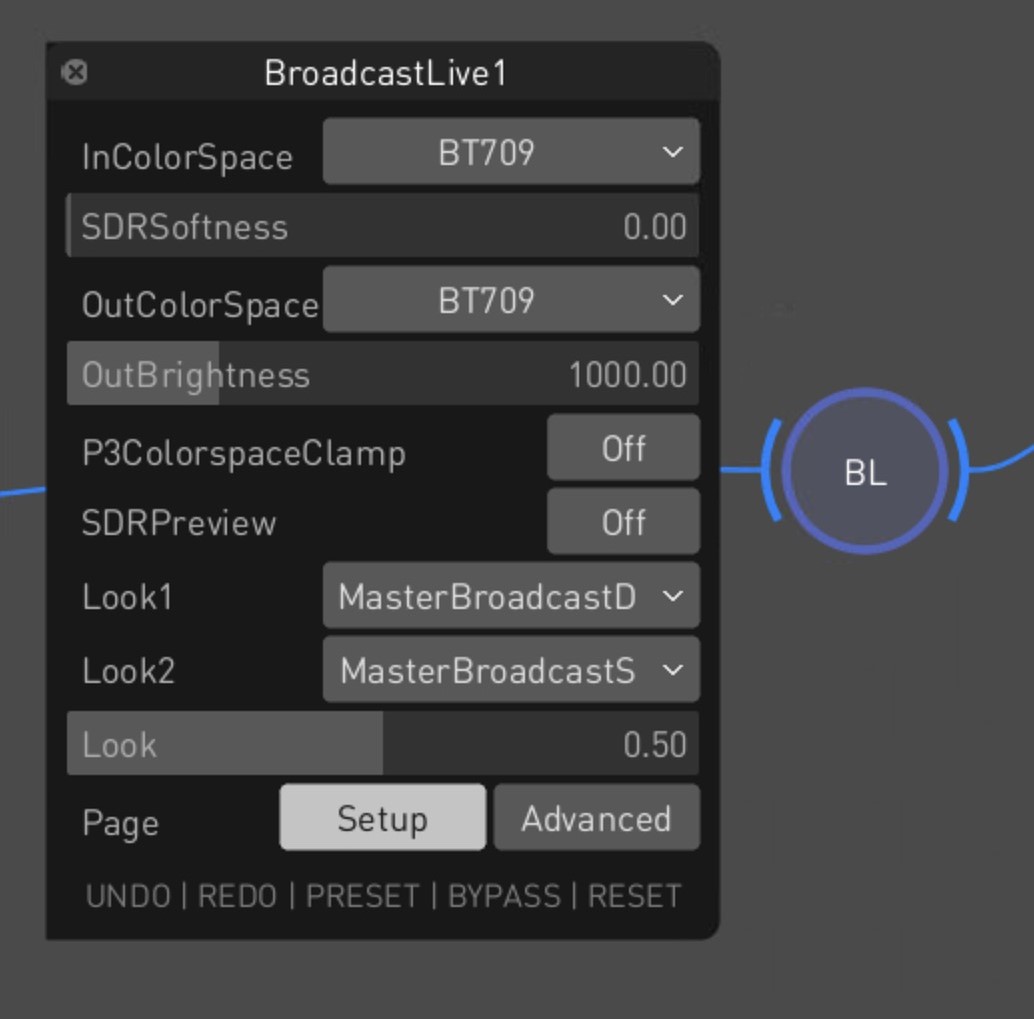
Broadcast Live Tool
The Broadcast Live tool extends the capabilities of Broadcast TV with support for scene-referred camera inputs and advanced tone mapping. For camera inputs, the tool features cinematic and broadcast look processing. It supports formats such as S-Log3, LogC, and C-Log.
Playhead Context Menu
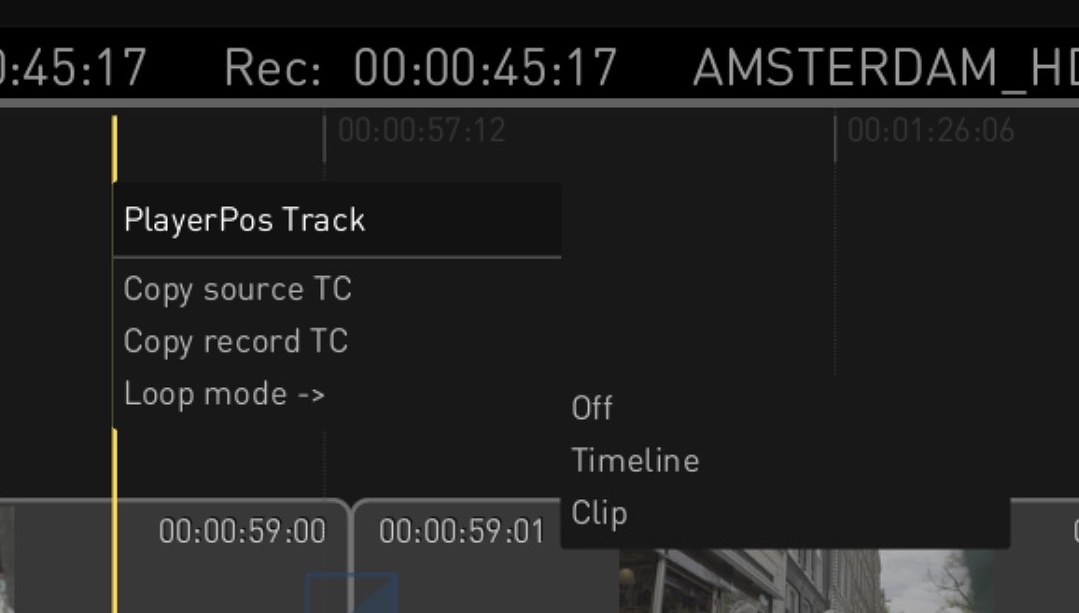
A new playhead context menu gives quick access to timeline functions directly from the playhead indicator. Right-clicking the yellow line lets you copy the source or record timecode for pasting into external apps for reference or logging. You can also toggle loop modes, with options to loop either the entire timeline or just the current clip, enabling more flexible playback control.
Comprehensive Media Report
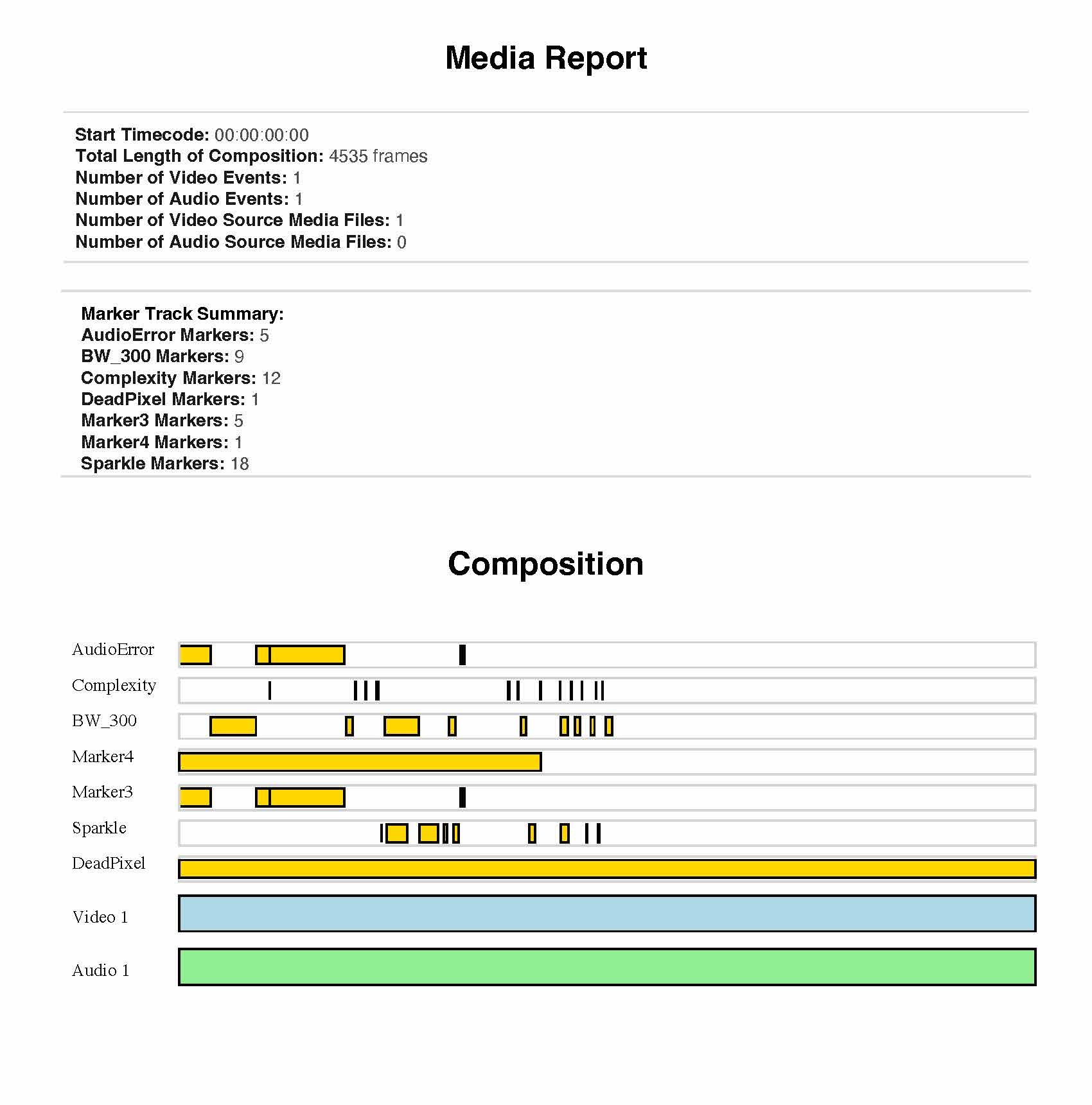
The Media Report PDF menu option provides an in-depth overview of the timeline’s content. The report includes basic metadata, a visual timeline overview, HDR analysis with Max FALL/CLL values and tolerance data, and dedicated QC summaries. It covers framing, audio errors, loudness, and other marker-based checks, offering a complete snapshot of media content and quality status.
Pixel Picker with XY Coordinates
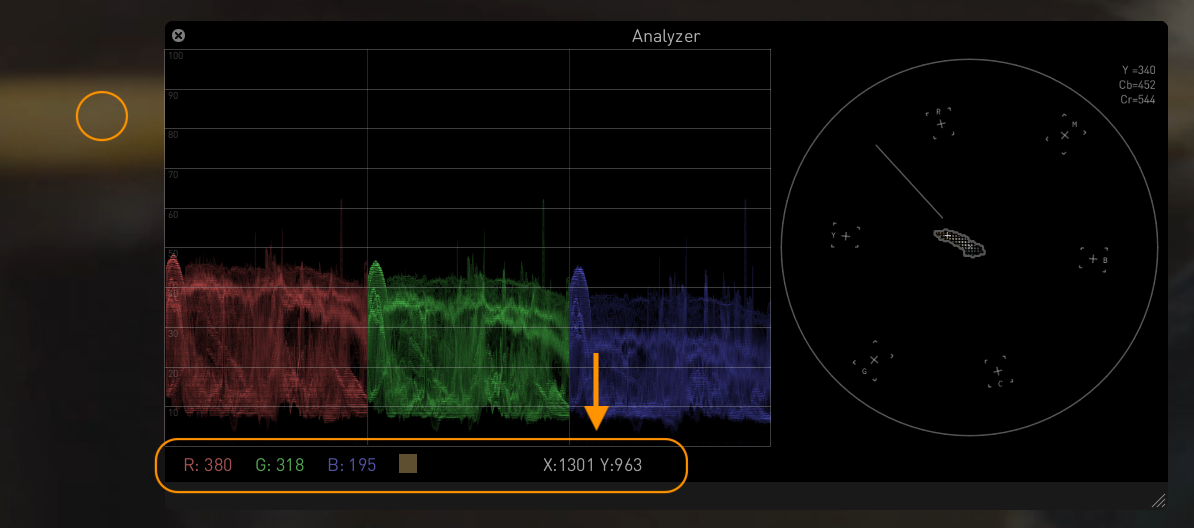
The Pixel Picker tool in the Analyzer now displays XY pixel coordinates along with RGB values, improving precision when inspecting specific pixels. When using Ctrl + click in the main viewer, the selected pixel’s X and Y coordinates appear in the bottom bar of the waveform graph, next to the RGB data. This enhancement makes detailed frame analysis more intuitive and accurate.
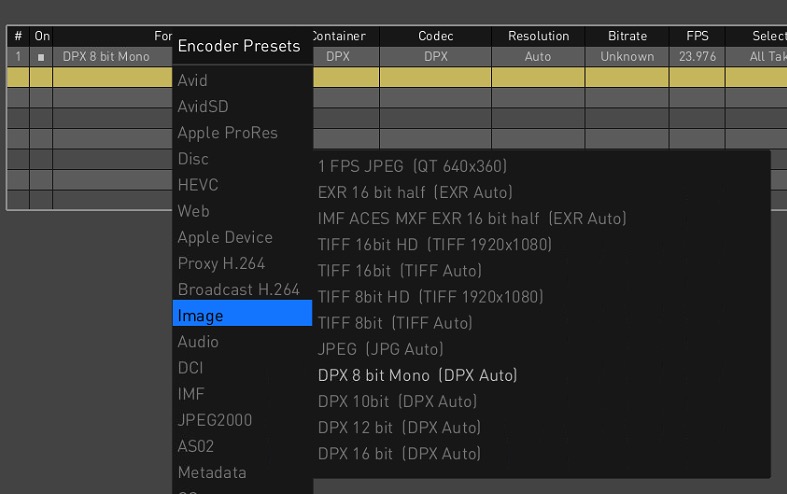
DPX 8-bit Monochrome Encoder
Transkoder now offers a dedicated DPX 8-bit Mono encoder in the Image encoder presets on the Render Page, enabling export of black-and-white footage as single-channel DPX files. This is especially useful for workflows that scan black-and-white film using a single color channel, optimizing storage while maintaining image quality. The encoder ensures smooth integration with existing DPX processing pipelines.
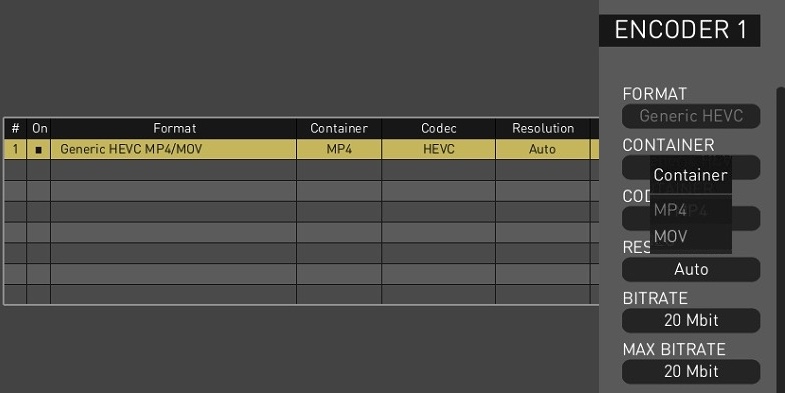
Generic HEVC MP4/MOV Encoder
Transkoder introduces a new Generic HEVC MP4/MOV encoder preset on the Render Page, enabling the creation of high-quality HEVC (H.265) files in either MP4 or MOV format without switching presets. This simplifies final delivery workflows and ensures proper metadata handling, including the colr atom for MOV files. The container format can be selected via the CONTAINER setting in the Configuration Pane.
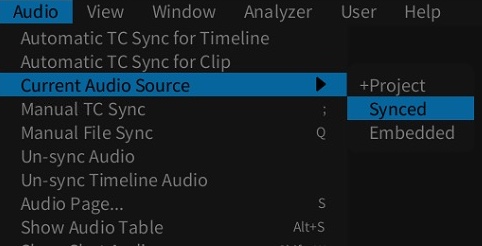
Switch Between Embedded and Synced Audio
On-Set Dailies now allows seamless switching between embedded and synced audio sources, improving playback and rendering flexibility. A new Current Audio Source option under the Audio menu lets users toggle between Synced and Embedded audio for the active Camroll or Labroll. The selection resets to the default Project setting upon exit, making it easy to manage audio without editing individual clips.
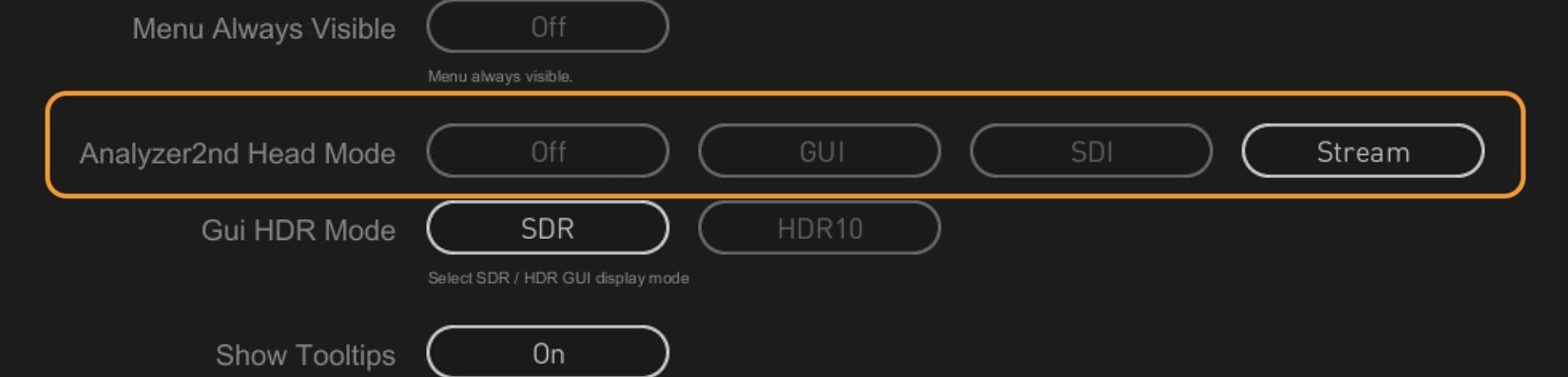
Secondary Stream for Analyzer Output
A new option enables streaming the Second Head Analyzer image as a secondary stream, enabling remote viewing of scopes and analysis tools without requiring a second physical monitor. This is ideal for remote QC workflows and virtual scope monitoring. The feature is available via the new Stream setting for the Analyzer2nd Head Mode parameter in the GUI Settings, and is supported on M1/M2 Macs, Windows, and Linux.
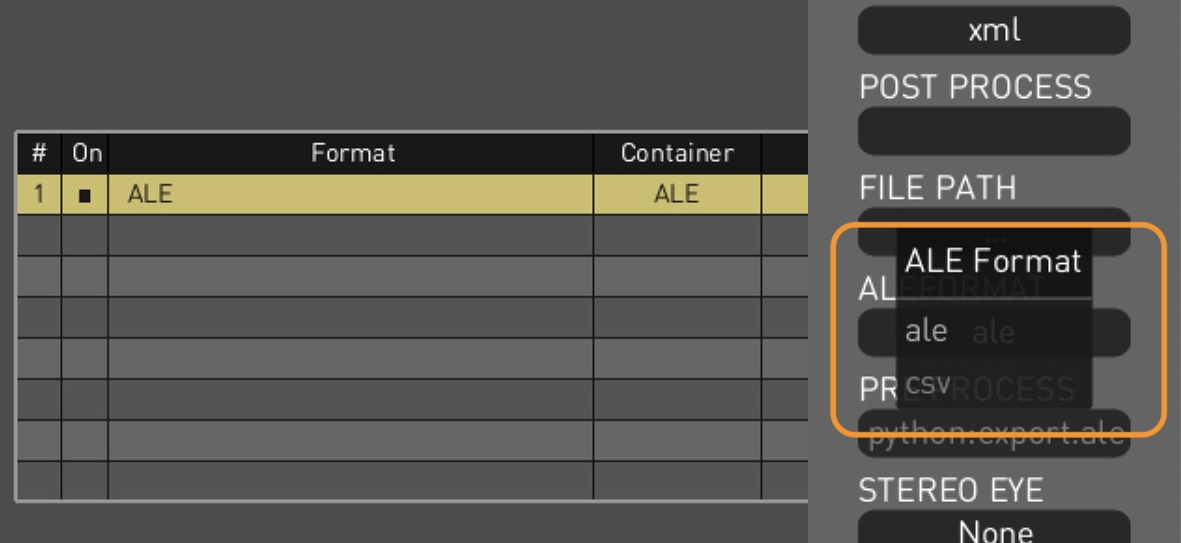
Export ALE as CSV
On-Set Dailies now supports exporting dailies metadata in CSV format alongside ALE, directly from the ALE encoder in the Metadata presets, eliminating the need for manual conversions. A new ALE FORMAT option in the Configuration Pane lets users choose between ALE or CSV, with the file extension updating accordingly.
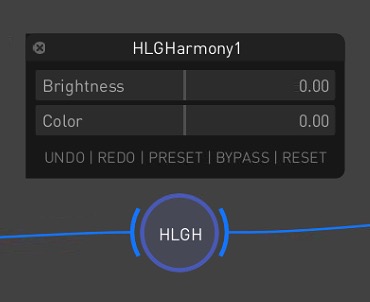
Tool for HLG Fine-Tuning
Transkoder introduces HLG Harmony, a new node in the Colorspace toolset, designed for intuitive cleanup of excessive Hybrid Log-Gamma levels and color. It features dedicated Brightness and Color sliders, enabling precise adjustments without the complexity of traditional grading tools—ideal for quickly refining HLG content in broadcast and delivery workflows.
Export ALE as CSV
Transkoder now supports exporting dailies metadata in CSV format alongside ALE, directly from the ALE encoder in the Metadata presets, eliminating the need for manual conversions. A new ALE FORMAT option in the Configuration Pane lets users choose between ALE or CSV, with the file extension updating accordingly.
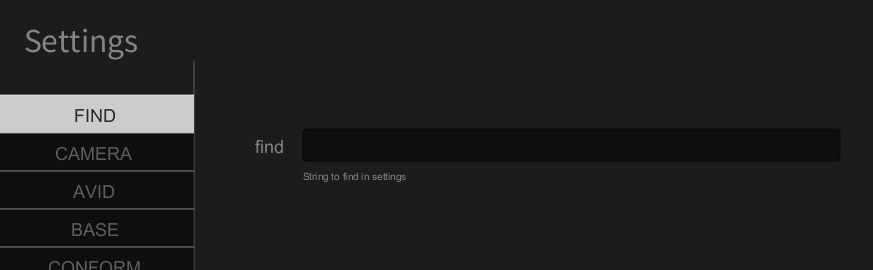
Search Function for Settings
The Settings Page now includes a search feature under the FIND tab, letting users quickly locate options by entering setting names or description keywords. This enhancement streamlines navigation across the growing list of configurable parameters within the various tabs of the Settings interface.
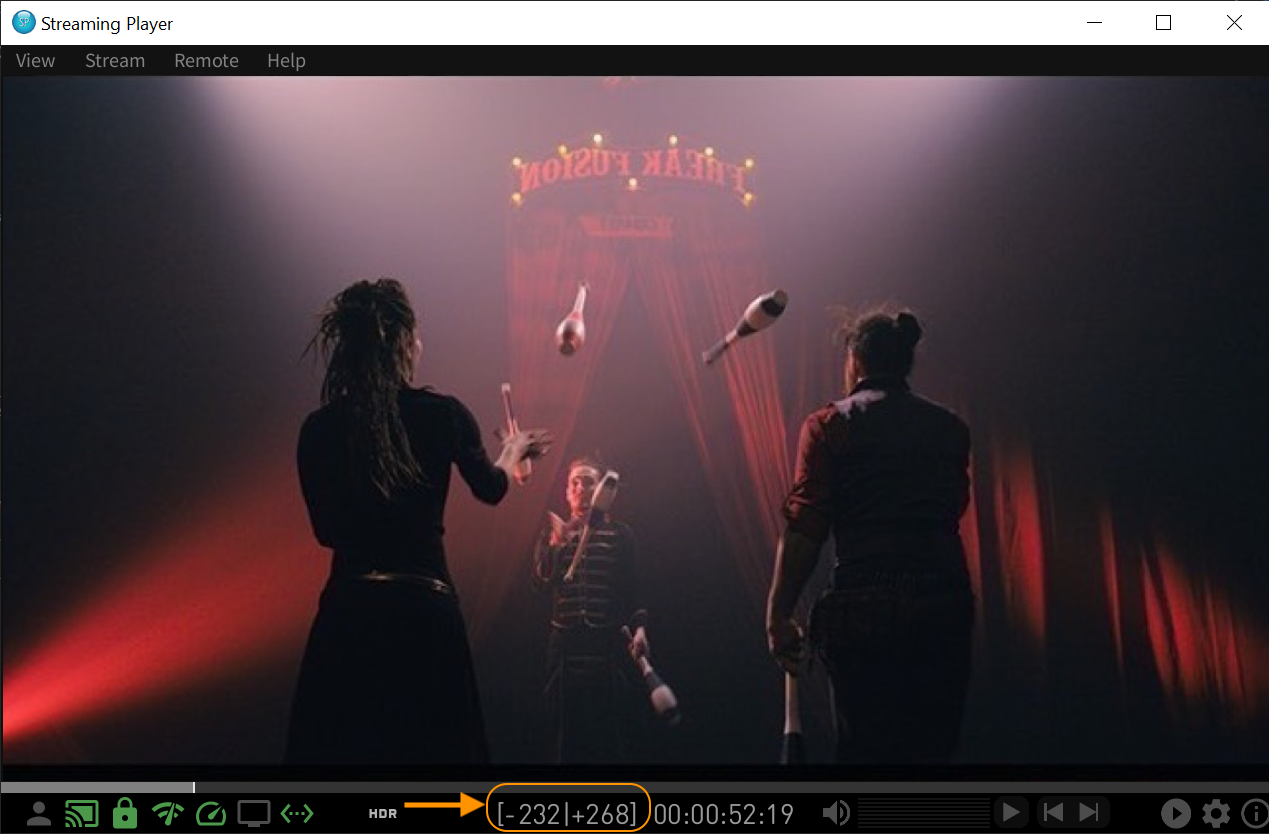
Zero Latency Streaming
On-Set Dailies now supports real-time, zero-latency streaming via the Streaming Player using a new pre-caching feature that locally stores frames for smooth playback. This provides QC operators with an experience comparable to on-premises viewing. The cache size is adjustable via the Stream Cache Size setting in the Streaming Player’s Advanced Settings. Cached frame ranges are shown in the navigation bar, enabling instant backward and forward playback within the buffer.
Have any questions?
Contact Colorfront help center with Transkoder & On-Set Dailies user guides and tutorial videos.
Frequently Asked Question
What are On-Set Dailies used for?
On-Set Dailies (OSD) is Colorfront's professional dailies processing application designed for on-set and near-set workflows. It is used to ingest, transcode, grade, and output dailies from camera originals in real time or near real time. OSD is built for the demands of film and television productions where speed, color accuracy, and reliability are critical from day one of the shoot.
What is the difference between On-Set Dailies and Express Dailies?
On-Set Dailies is a full-featured dailies platform designed for facilities that require complex color pipelines, multiple deliverables, and the deepest level of control over their dailies workflow. Express Dailies is designed for productions that need a faster, more streamlined interface for less complex color workflows and project outputs, making it well suited for near-set and simpler facility environments. Both are built on the same Colorfront Engine for color accuracy.
Can On-Set Dailies be used for the same jobs as Transkoder?
OSD and Transkoder share some underlying technology but serve different purposes. OSD is purpose-built for dailies — fast ingest, grading, and output from set. Transkoder is a full mastering platform covering DCP, IMF, Dolby Vision encoding, and complex deliverables. While OSD can handle many transcoding tasks, it is not a substitute for Transkoder's mastering capabilities.
What platforms does On-Set Dailies run on?
On-Set Dailies runs on both Windows and macOS, including Apple Silicon. Recommended hardware configurations include Supermicro workstations with NVIDIA GPUs for Windows, and Mac Studio with Apple M-series chips for macOS. For video output, AJA KONA and Blackmagic DeckLink cards are supported.
Does On-Set Dailies support HDR workflows?
Yes. On-Set Dailies supports HDR workflows including ACES and the Colorfront Engine. This ensures color-accurate monitoring and output for both SDR and HDR deliverables from the dailies stage.
Does On-Set Dailies support remote streaming?
Yes. OSD has the ability to stream directly from the software. It also integrates with the Colorfront Streaming Server via SDI or NDI for remote review and approval workflows. This allows directors, cinematographers, and clients to review dailies remotely with reference-quality color accuracy.
What operator training does Colorfront provide?
Colorfront provides operator training for OSD and other products. Training availability, format, and pricing vary. Please contact your local Colorfront reseller or the Colorfront support team directly to discuss training options tailored to your team's needs.
What happens if my license dongle is lost or stolen?
Please contact Colorfront support immediately if a license dongle is lost or stolen. The support team will advise on next steps. Depending on your support agreement, a replacement may be available. It is important to report the loss promptly to protect your license and discuss options with the team.
Can I get a trial license?
Trial license availability varies. Please reach out to your local Colorfront reseller or the Colorfront sales team to inquire about trial or evaluation options for On-Set Dailies.
What are Colorfront's support hours?
Colorfront's support team is available Monday to Friday, 9am to 6pm Budapest time and 9am to 6pm Los Angeles time, providing coverage across European and US business hours. Support is available to customers with active support agreements and can be reached via the Colorfront support portal. The fastest way to get in touch with support is to send an email to support@colorfront.com and a team member will get back to you as quickly as possible.